ActivityOwner.Com http://www.activityowner.com/gyroq-invitations/ http://www.activityowner.com/gyroq-invitations/ http://www.activityowner.com/category/mindreader/ http://www.activityowner.com/category/mindreader/ http://www.activityowner.com http://www.activityowner.com http://www.mindjet.com http://www.mindjet.com http://www.activityowner.com/subscribe/ http://www.activityowner.com/subscribe/ http://wiki.activityowner.com/index.php?title=ResultsManager_Resources http://wiki.activityowner.com/index.php?title=ResultsManager_Resources http://wiki.activityowner.com/index.php?title=MindManager_Macro_Library http://wiki.activityowner.com/index.php?title=MindManager_Macro_Library http://wiki.activityowner.com http://wiki.activityowner.com http://www.activityowner.com/feed/ http://www.activityowner.com/feed/ http://wiki.activityowner.com/index.php?title=GyroQ_Tag_Library http://wiki.activityowner.com/index.php?title=GyroQ_Tag_Library http://www.activityowner.com/article-archive/ http://www.activityowner.com/article-archive/ http://www.activityowner.com/category/resultsmanager/ http://www.activityowner.com/category/resultsmanager/ http://www.activityowner.com/search/ http://www.activityowner.com/search/ http://www.activityowner.com/gyroq-invitations/ http://www.activityowner.com/gyroq-invitations/ http://www.activityowner.com/2007/02/27/top-12-mindmanagerresultsmanager-setup-tips/ http://www.activityowner.com/2007/02/27/top-12-mindmanagerresultsmanager-setup-tips/ http://www.activityowner.com/2007/05/09/mindmanager-7/ http://www.activityowner.com/2007/05/09/mindmanager-7/ http://www.activityowner.com/2007/02/20/gyroq-top-20-uses-revisited/ http://www.activityowner.com/2007/02/20/gyroq-top-20-uses-revisited/ http://wiki.activityowner.com/index.php?title=MindReader http://wiki.activityowner.com/index.php?title=MindReader http://www.activityowner.com/category/gyroq/ http://www.activityowner.com/category/gyroq/ http://www.activityowner.com/category/mindmanager/ http://www.activityowner.com/category/mindmanager/ http://wiki.activityowner.com/index.php?title=MindManager_Resources http://wiki.activityowner.com/index.php?title=MindManager_Resources http://www.gyronix.com/resultsmanager.php http://www.gyronix.com/resultsmanager.php http://wiki.activityowner.com/index.php?title=ResultsManager_Dashboard_Library http://wiki.activityowner.com/index.php?title=ResultsManager_Dashboard_Library http://wiki.activityowner.com/index.php?title=Mindmanager7_Setup_Tips http://wiki.activityowner.com/index.php?title=Mindmanager7_Setup_Tips http://www.activityowner.com/2007/05/30/resultsmanager-7-preview/ http://www.activityowner.com/2007/05/30/resultsmanager-7-preview/ http://wiki.activityowner.com/index.php?title=GyroQ_Resources http://wiki.activityowner.com/index.php?title=GyroQ_Resources http://wiki.activityowner.com/index.php?title=MindReader_Quick_Start http://wiki.activityowner.com/index.php?title=MindReader_Quick_Start http://wiki.activityowner.com/index.php?title=MindReader http://wiki.activityowner.com/index.php?title=MindReader

Wiki Authors/Editors Wanted

Activity in the MindJet/Gyronix space has been heating up recently with the introduction of MindManager 8 along with impending new releases of GyroQ, ResultsManager, and DecisionMill.

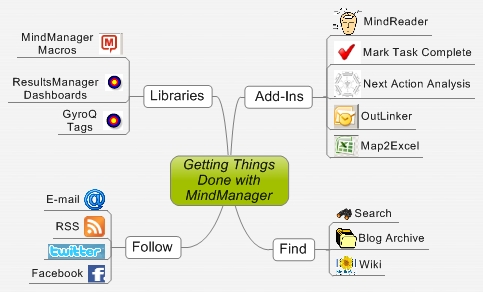
For the past year and a half I have been using wiki.activityowner.com as a convenient way to share MindManager macros, ResultsManager dashboard templates, and GyroQ tags. While I prefer to limit all the macro/tag code on the site to items I've uploaded so that I can keep it consistent and supportable, it would be great if more users/readers could contribute to improving the documentation around installing and using the tools for getting things done (GTD). While several readers routinely contribute to the wiki, I realized I had never posted directly with a request for help.

I encourage you to create an account and start editing. Don't worry if you are not an expert in wiki markup language — just get the updated text in and others can always improve formatting.

Some basic tips:

  • To create a new page just edit an existing page and add [[newpagename]] into the text. Once you save it, the new page link will appear in red and you can add content to it by clicking on it.
  • To create a new section, just enclose in ==New Section Name==
  • To add a bulleted or numbered list, preceed items with *or #

You can learn about markup hitting clicking on the "view source" tab on existing pages when you are not logged in.
Add this Blog Entry to del.icio.us
Stumble it!
Add to ActivityOwner.com to your Technorati Favorites

1 Comment »

  1. Hans said,

    December 23, 2008 @ 4:02 am

    It's been some time since I've used mindreader. Due to switching jobs, no laptop etc I've been wandering around looking in the clouds for a good replacement… There are some nice apps, but none have the easy of use of entering a simple sentence and doing the markup automaggicly.. (and being able to adjust the code ) So, back to here… and starting all over. Perhaps adding some wiki entries as well

RSS feed for comments on this post · TrackBack URI

Leave a Comment

Creative Commons License
This work is licensed under a Creative Commons Attribution-ShareAlike 2.5 License.